

The DALL·E AI Image Creator is one of the most advanced artificial intelligence tools designed for turning text descriptions into highly detailed visual images. Developed by OpenAI, this technology has revolutionized how designers, marketers, bloggers, and creators produce visual content.
Instead of using traditional design software, users can simply describe what they want, and the AI generates images in seconds. This shift has dramatically changed digital creativity, making professional-grade visuals accessible to everyone.
In this complete guide, you will learn how the DALL·E AI Image Creator works, how to use it effectively, advanced prompting strategies, SEO benefits, real-world applications, and industry comparisons.
What Is DALL·E AI Image Creator?
The DALL·E AI Image Creator is a generative AI system that converts natural language prompts into images. It understands context, style, objects, lighting, composition, and artistic intent.
At its core, it combines machine learning models trained on millions of images and text pairs to generate new, original visuals.
Unlike stock images, every output from the DALL·E AI Image Creator is unique and generated in real time.
For official documentation, visit:
OpenAI DALL·E
How DALL·E AI Image Creator Works (Technical Breakdown)
Understanding how the system works helps users create better prompts.
1. Text Understanding
The AI first analyzes your prompt and breaks it into meaningful components:
- Objects (e.g., car, mountain, person)
- Actions (e.g., flying, walking, glowing)
- Style (e.g., cinematic, cartoon, realism)
2. Semantic Mapping
The system maps words into visual concepts using deep learning embeddings.
3. Image Generation
It generates multiple possible interpretations of your prompt.
4. Refinement Process
The model refines outputs for:
- Clarity
- Lighting
- Composition
- Detail accuracy
The DALL·E AI Image Creator continuously improves output quality based on training data and feedback loops.
Why DALL·E AI Image Creator Is So Powerful
The popularity of the DALL·E AI Image Creator comes from several key advantages:
Speed
Images are generated in seconds, eliminating hours of manual design.
Creativity
It can produce ideas that may not exist in real-world photography.
Accessibility
No design skills are required.
Versatility
It supports:
- Marketing visuals
- Blog images
- Concept art
- Social media graphics
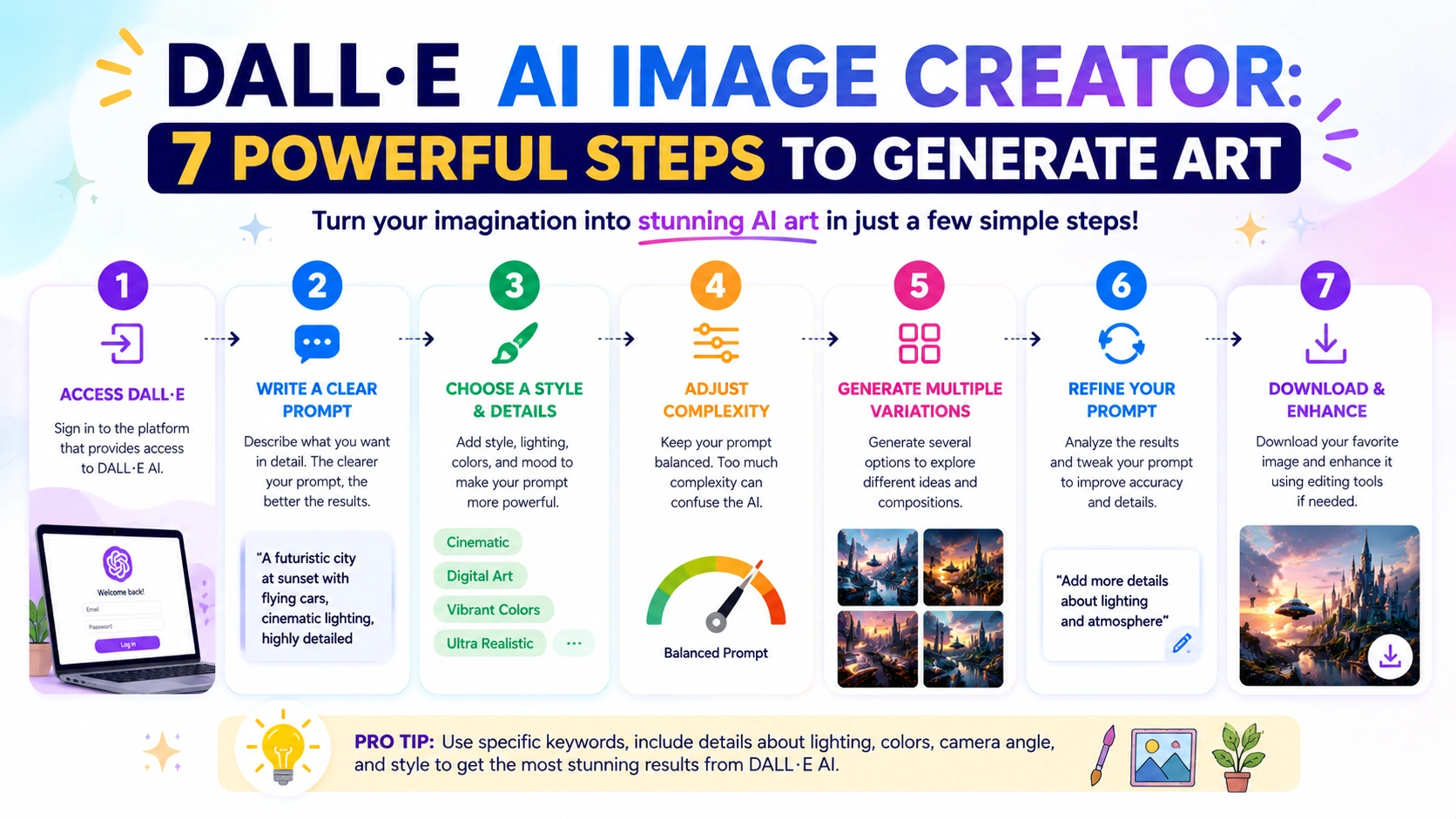
7 Powerful Steps to Use DALL·E AI Image Creator
Step 1: Access the Tool
To begin using the DALL·E AI Image Creator, you need access through platforms powered by OpenAI.
Many AI tools integrate DALL·E directly into their systems.
Step 2: Write a Strong Prompt
The quality of your output depends heavily on your prompt.
Weak prompt:
“a city”
Strong prompt:
“A futuristic cyberpunk city at night with neon lights, flying cars, cinematic perspective”
Step 3: Add Artistic Style
The DALL·E AI Image Creator responds strongly to style instructions:
- Photorealistic
- 3D rendering
- Anime style
- Watercolor painting
- Digital illustration
Step 4: Control Composition
You can guide the AI with:
- Camera angle (top view, close-up, wide shot)
- Lighting (sunset, neon, soft light)
- Focus (foreground, background depth)
Step 5: Generate Multiple Outputs
Always generate at least 3–4 variations. The DALL·E AI Image Creator produces different interpretations of the same prompt.
Step 6: Refine and Iterate
If results are not accurate:
- Add more details
- Remove vague terms
- Specify object positions
Iteration is key to mastering AI image generation.
Step 7: Download and Edit
After selecting the best image:
- Download it
- Edit using tools like Photoshop or Canva
- Use it in blogs, ads, or social media
Advanced Prompt Engineering for DALL·E AI Image Creator
To fully master the DALL·E AI Image Creator, you need advanced prompting techniques.
1. Layered Prompting
Structure your prompt in layers:
- Subject
- Environment
- Style
- Lighting
- Emotion
Example:
“A golden retriever sitting in a rainy street, cinematic lighting, ultra-realistic, emotional tone, shallow depth of field”
2. Negative Prompting Concept
Even though DALL·E doesn’t directly support negative prompts, you can imply exclusions:
- “without blur”
- “no distortion”
- “clean background”
3. Emotion-Based Prompting
Adding emotion improves realism:
- peaceful landscape
- dramatic battle scene
- joyful celebration
4. Industry Prompt Templates
For marketing:
“Modern product advertisement, clean white background, soft shadows, high-end studio lighting”
For blogging:
“Illustration of digital marketing workflow, flat design style, minimal aesthetic”
Real-World Use Cases of DALL·E AI Image Creator
1. Blogging and Content Creation
Bloggers use the DALL·E AI Image Creator to generate featured images instead of stock photos.
2. Digital Marketing
Marketers create:
- Ad creatives
- Social media posts
- Product mockups
3. Game Development
Developers generate:
- Concept art
- Character designs
- Environment layouts
4. Education
Teachers use AI-generated visuals for:
- Learning diagrams
- Science illustrations
- History recreations
5. E-Commerce
Businesses create:
- Product previews
- Packaging concepts
- Branding visuals
DALL·E AI Image Creator vs Other AI Tools
The AI image generation space includes competitors like Midjourney.
DALL·E Advantages
- Easier for beginners
- Strong prompt interpretation
- Integrated ecosystem via OpenAI
Midjourney Advantages
- Highly artistic outputs
- Strong stylistic consistency
- Community-driven prompting
Each tool has strengths, but the DALL·E AI Image Creator is often preferred for usability and accessibility.
For users who want to explore more artistic and cinematic results, you can learn more about the tool here:
Midjourney AI Image Generator: Create Stunning AI Art
SEO Benefits of Using DALL·E AI Image Creator
Using AI-generated images improves SEO performance in multiple ways:
1. Faster Content Production
More content = more ranking opportunities
2. Unique Visuals
Google prefers original images over stock photos
3. Lower Bounce Rate
Engaging visuals keep users on-page longer
4. Improved Social Sharing
Unique images increase CTR on social platforms
Common Mistakes When Using DALL·E AI Image Creator
1. Vague Prompts
Avoid:
“a nice picture”
2. Overloading Prompts
Too many instructions confuse the AI.
3. Ignoring Style Keywords
Style dramatically affects output quality.
4. Not Iterating
First result is rarely the best.
Troubleshooting DALL·E AI Image Creator Issues
Problem: Blurry Images
Solution: Add “high resolution, sharp focus”
Problem: Wrong Objects
Solution: Be more specific with nouns
Problem: Poor Composition
Solution: Add camera angle instructions
Future of DALL·E AI Image Creator
The future of the DALL·E AI Image Creator includes:
- Real-time video generation
- 3D asset creation
- Interactive design workflows
- AI-assisted branding systems
AI image generation will become a core part of digital content production.
Ethical Considerations
While powerful, AI-generated images raise concerns:
- Copyright ambiguity
- Deepfake misuse
- Content authenticity
Users should apply ethical guidelines when using the DALL·E AI Image Creator.
Conclusion
The DALL·E AI Image Creator is transforming the way we produce visual content. From marketers to designers to bloggers, anyone can now generate high-quality images instantly using simple text prompts.
By mastering prompt engineering, iteration, and creative thinking, users can unlock the full potential of AI-generated visuals.
As AI technology evolves, tools like this will become essential for digital creativity, marketing, and content production.